所用项目及服务器
ThinkPHP:https://github.com/top-think/framework think-captcha:https://github.com/top-think/think-captcha captcha_trainer (训练):https://github.com/kerlomz/captcha_trainer captcha_platform (部署):https://github.com/kerlomz/captcha_platform MuggleOCR:https://pypi.org/project/muggle-ocr captcha_trainer 作者介绍:https://www.jianshu.com/p/80ef04b16efc 矩池云 GPU服务器:https://matpool.com/
captcha_trainer 使用过程
使用 ThinkPHP 调用 think-captcha 生成验证码
修改 think-captcha 源码,将验证码存储到 Session 在
vendor/topthink/think-captcha/src/Captcha.php:195插入以下代码1Session::set('captcha', implode('', $code), '');在控制器内打印验证码
使用 Python 抓取图片验证码样本,按照 captcha_trainer 默认规则重命名保存
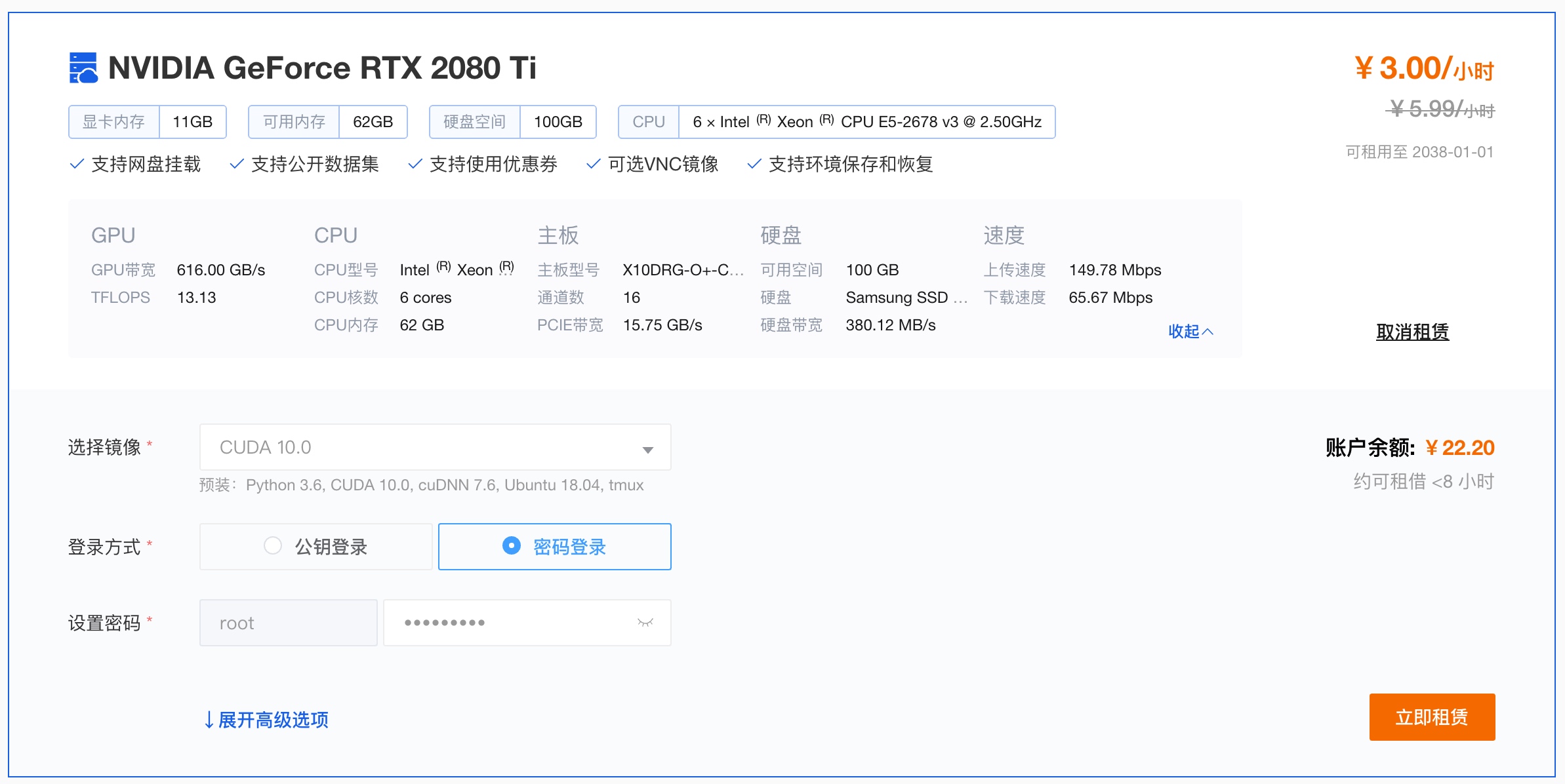
1 2 3 4 5 6 7 8 9 10 11 12 13 14 15 16 17 18 19 20 21 22 23 24 25 26 27 28 29 30import requests import threading import os import hashlib # def md5(s, salt=''): new_s = str(s) + salt m = hashlib.md5(new_s.encode()) return m.hexdigest() # def get_captcha(): session = requests.session() for i in range(0, 100000): try: content = session.get('http://x.com/captcha?'+str(i)) if content.status_code != 200: continue code = session.get('http://x.com/index/Home/code') if code.status_code != 200: continue filename = '{}_{}.png'.format(code.text, md5(content.content)) with open(os.path.join('captcha_images', filename), 'wb') as f: f.write(content.content) f.close() except Exception as e: print(str(e)) # for i in range(1, 20): t = threading.Thread(target=get_captcha, args=()) t.start()租用矩池云 RTX 2080 Ti 的GPU服务器进行训练
使用 captcha_trainer 进行训练
配置训练环境及项目
model.yaml模板参数介绍请参考 captcha_trainer 项目介绍,可以用 Windows 编译版生成后上传至服务器,需保持项目名一致。项目名 TP-CNNX-GRU-H64-CTC-C1
./projects/TP-CNNX-GRU-H64-CTC-C1/model.yaml1 2 3 4 5 6 7 8 9 10 11 12 13 14 15 16 17 18 19 20 21 22 23 24 25 26 27 28 29 30 31 32 33 34 35 36 37 38 39 40 41 42 43 44 45 46 47 48 49 50 51 52 53 54 55 56 57 58 59 60 61 62 63 64 65 66 67 68 69 70 71 72 73 74 75 76 77 78 79 80 81 82 83 84 85 86 87 88 89 90 91 92 93 94 95 96 97 98 99 100 101 102 103 104 105 106 107 108 109 110 111 112 113 114 115 116 117 118 119 120 121 122 123 124 125 126 127 128 129 130 131 132 133 134 135 136 137 138 139 140 141 142 143 144 145 146 147 148 149 150 151 152 153 154 155 156 157 158# - requirement.txt - GPU: tensorflow-gpu, CPU: tensorflow # - If you use the GPU version, you need to install some additional applications. System: MemoryUsage: 0.8 Version: 2 # CNNNetwork: [CNN5, ResNet, DenseNet] # RecurrentNetwork: [CuDNNBiLSTM, CuDNNLSTM, CuDNNGRU, BiLSTM, LSTM, GRU, BiGRU, NoRecurrent] # - The recommended configuration is CNN5+GRU # UnitsNum: [16, 64, 128, 256, 512] # - This parameter indicates the number of nodes used to remember and store past states. # Optimizer: Loss function algorithm for calculating gradient. # - [AdaBound, Adam, Momentum] # OutputLayer: [LossFunction, Decoder] # - LossFunction: [CTC, CrossEntropy] # - Decoder: [CTC, CrossEntropy] NeuralNet: CNNNetwork: CNNX RecurrentNetwork: GRU UnitsNum: 64 Optimizer: RAdam OutputLayer: LossFunction: CTC Decoder: CTC # ModelName: Corresponding to the model file in the model directory # ModelField: [Image, Text] # ModelScene: [Classification] # - Currently only Image-Classification is supported. Model: ModelName: TP-CNNX-GRU-H64-CTC-C1 ModelField: Image ModelScene: Classification # FieldParam contains the Image, Text. # When you filed to Image: # - Category: Provides a default optional built-in solution: # -- [ALPHANUMERIC, ALPHANUMERIC_LOWER, ALPHANUMERIC_UPPER, # -- NUMERIC, ALPHABET_LOWER, ALPHABET_UPPER, ALPHABET, ALPHANUMERIC_CHS_3500_LOWER] # - or can be customized by: # -- ['Cat', 'Lion', 'Tiger', 'Fish', 'BigCat'] # - Resize: [ImageWidth, ImageHeight/-1, ImageChannel] # - ImageChannel: [1, 3] # - In order to automatically select models using image size, when multiple models are deployed at the same time: # -- ImageWidth: The width of the image. # -- ImageHeight: The height of the image. # - MaxLabelNum: You can fill in -1, or any integer, where -1 means not defining the value. # -- Used when the number of label is fixed # When you filed to Text: # This type is temporarily not supported. FieldParam: Category: ['2', '3', '4', '5', '6', '7', '8', 'a', 'b', 'c', 'd', 'e', 'f', 'h', 'i', 'j', 'k', 'm', 'n', 'p', 'q', 'r', 's', 't', 'u', 'v', 'w', 'x', 'y', 'z', 'A', 'B', 'C', 'D', 'E', 'F', 'G', 'H', 'J', 'K', 'L', 'M', 'N', 'P', 'Q', 'R', 'T', 'U', 'V', 'W', 'X', 'Y'] Resize: [224, 70] ImageChannel: 1 ImageWidth: 224 ImageHeight: 70 MaxLabelNum: 4 OutputSplit: AutoPadding: True # The configuration is applied to the label of the data source. # LabelFrom: [FileName, XML, LMDB] # ExtractRegex: Only for methods extracted from FileName: # - Default matching apple_20181010121212.jpg file. # - The Default is .*?(?=_.*\.) # LabelSplit: Only for methods extracted from FileName: # - The split symbol in the file name is like: cat&big cat&lion_20181010121212.png # - The Default is null. Label: LabelFrom: FileName ExtractRegex: .*?(?=_) LabelSplit: # DatasetPath: [Training/Validation], The local absolute path of a packed training or validation set. # SourcePath: [Training/Validation], The local absolute path to the source folder of the training or validation set. # ValidationSetNum: This is an optional parameter that is used when you want to extract some of the validation set # - from the training set when you are not preparing the validation set separately. # SavedSteps: A Session.run() execution is called a Step, # - Used to save training progress, Default value is 100. # ValidationSteps: Used to calculate accuracy, Default value is 500. # EndAcc: Finish the training when the accuracy reaches [EndAcc*100]% and other conditions. # EndCost: Finish the training when the cost reaches EndCost and other conditions. # EndEpochs: Finish the training when the epoch is greater than the defined epoch and other conditions. # BatchSize: Number of samples selected for one training step. # ValidationBatchSize: Number of samples selected for one validation step. # LearningRate: [0.1, 0.01, 0.001, 0.0001] # - Use a smaller learning rate for fine-tuning. Trains: DatasetPath: Training: - ./projects/TP-CNNX-GRU-H64-CTC-C1/dataset/Trains.0.tfrecords Validation: - ./projects/TP-CNNX-GRU-H64-CTC-C1/dataset/Validation.0.tfrecords SourcePath: Training: - /root/captcha_images Validation: ValidationSetNum: 300 SavedSteps: 100 ValidationSteps: 500 EndAcc: 0.95 EndCost: 0.5 EndEpochs: 2 BatchSize: 64 ValidationBatchSize: 300 LearningRate: 0.001 # Binaryzation: The argument is of type list and contains the range of int values, -1 is not enabled. # MedianBlur: The parameter is an int value, -1 is not enabled. # GaussianBlur: The parameter is an int value, -1 is not enabled. # EqualizeHist: The parameter is an bool value. # Laplace: The parameter is an bool value. # WarpPerspective: The parameter is an bool value. # Rotate: The parameter is a positive integer int type greater than 0, -1 is not enabled. # PepperNoise: This parameter is a float type less than 1, -1 is not enabled. # Brightness: The parameter is an bool value. # Saturation: The parameter is an bool value. # Hue: The parameter is an bool value. # Gamma: The parameter is an bool value. # ChannelSwap: The parameter is an bool value. # RandomBlank: The parameter is a positive integer int type greater than 0, -1 is not enabled. # RandomTransition: The parameter is a positive integer int type greater than 0, -1 is not enabled. DataAugmentation: Binaryzation: -1 MedianBlur: -1 GaussianBlur: -1 EqualizeHist: False Laplace: False WarpPerspective: False Rotate: -1 PepperNoise: -1.0 Brightness: False Saturation: False Hue: False Gamma: False ChannelSwap: False RandomBlank: -1 RandomTransition: -1 RandomCaptcha: Enable: False FontPath: # Binaryzation: The parameter is an integer number between 0 and 255, -1 is not enabled. # ReplaceTransparent: Transparent background replacement, bool type. # HorizontalStitching: Horizontal stitching, bool type. # ConcatFrames: Horizontally merge two frames according to the provided frame index list, -1 is not enabled. # BlendFrames: Fusion corresponding frames according to the provided frame index list, -1 is not enabled. # - [-1] means all frames Pretreatment: Binaryzation: -1 ReplaceTransparent: True HorizontalStitching: False ConcatFrames: -1 BlendFrames: -1 ExecuteMap: {}打包训练集后开始训练
Linux 训练环境强制结束任务
因为 think-captcha 随机调用系统字体生成图片验证码,部分字体显示只有大写字母,与 think-captcha 生成的验证码存在大小写偏差,导致 captcha_trainer 训练正确率只能维持在 0.6 左右,无法满足结束训练任务的 0.95 正确率,但忽略大小写后的正确率已满足需求,所以需要强制结束训练任务,编译模型。
Windows 环境下可以直接点击 Stop 按钮结束任务后再点击 Compile 按钮编译模型。
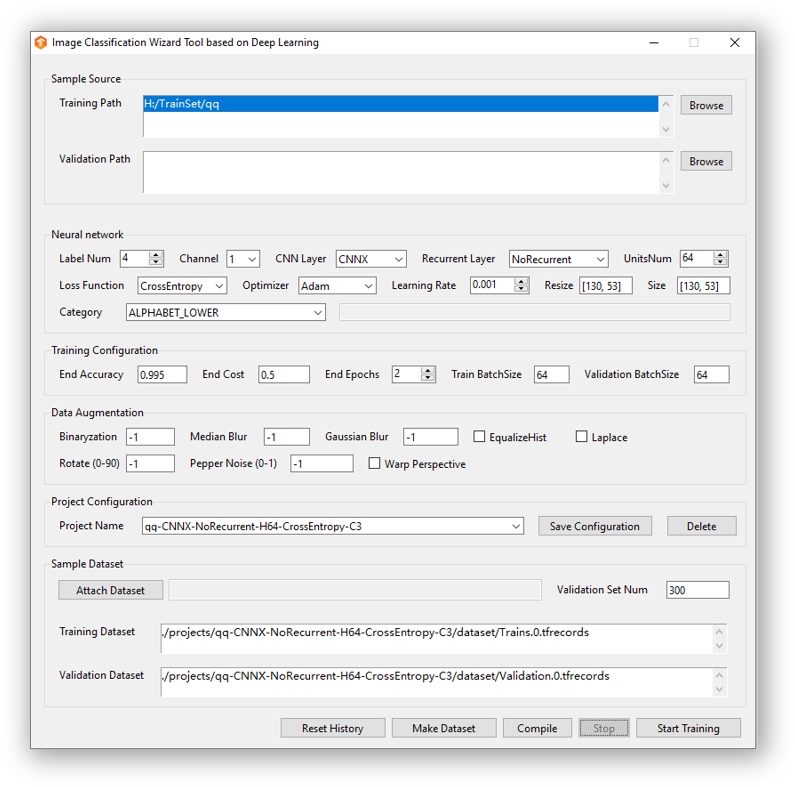
Linux 环境结束任务需要修改
trains.py代码,简单分析后发现trains.py共有两处正确率判断找到代码后直接简单粗暴的把判断条件改成
1==1让条件成立即可结束任务captcha_trainer 支持中断任务恢复,修改代码后按
Ctrl+C结束任务,重新执行python3 trains.py,初始化后将直接结束训练任务,编译模型。
部署验证码识别接口
使用 captcha_platform 项目进行 docker 部署
将 captcha_trainer 训练后编译生成的模型复制到 captcha_platform 项目中
1mv -rf captcha_trainer/out/* captcha_platform/构建并启动 docker
识别测试
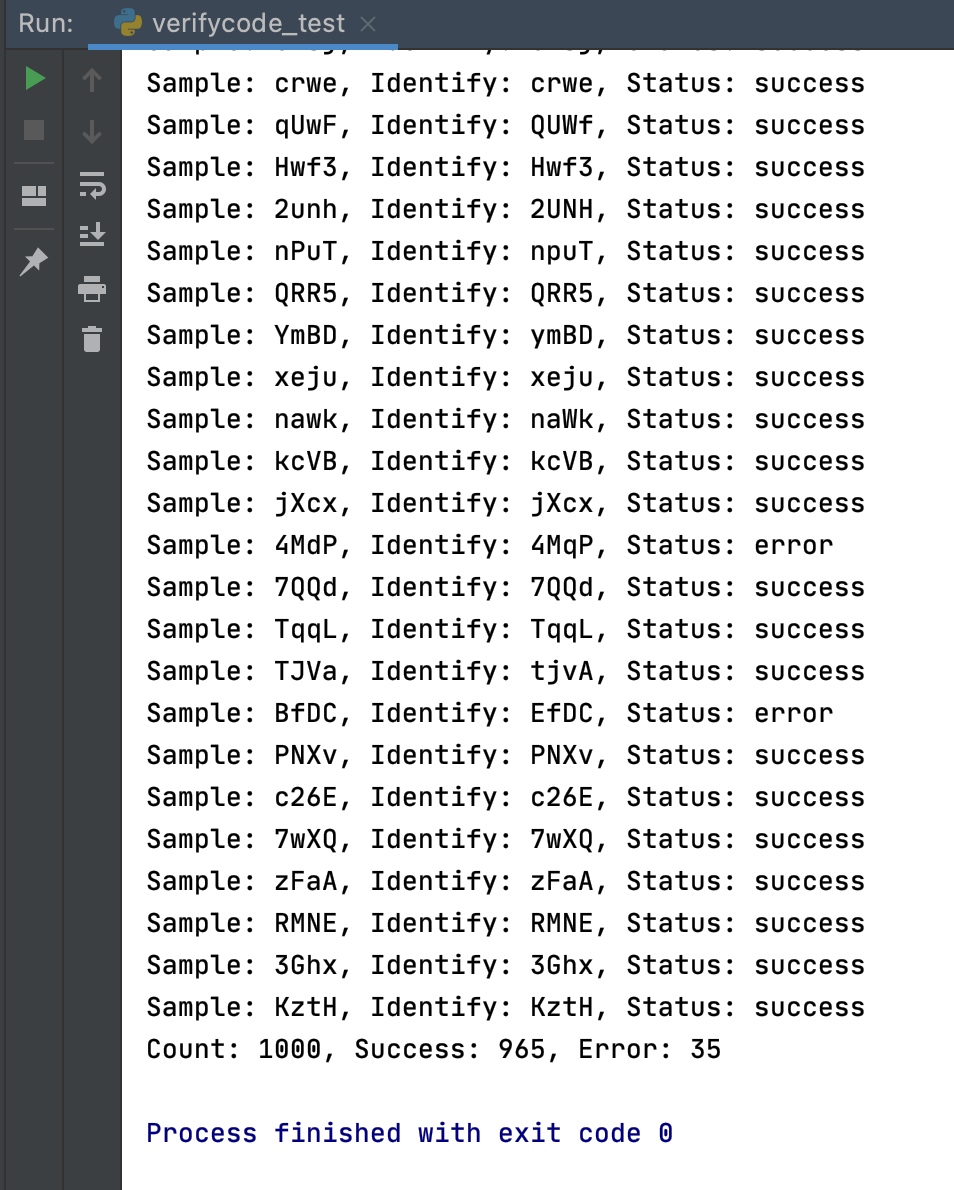
13万 think-captcha 图片验证码样本经过约 11 个小时的训练后,使用未经过训练的新样本进行识别测试,识别成功率在 95% 左右
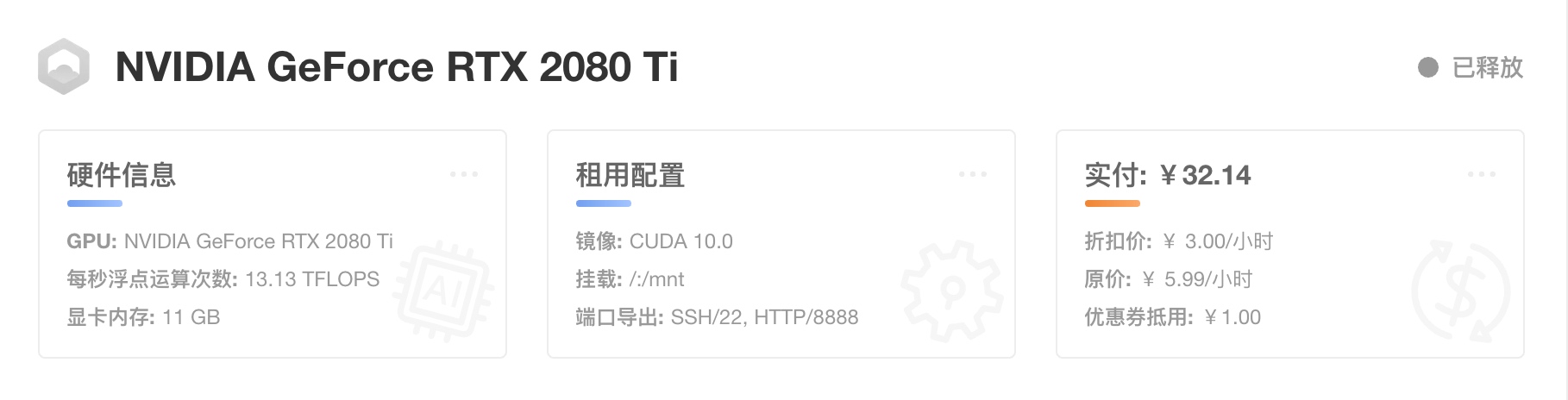
使用 Python 脚本进行识别测试
| |
测试结果
模型下载
链接: https://pan.baidu.com/s/1e0quRSqMV8lP6XXoS_Ty1g 提取码:sg6c